> For the complete documentation index, see [llms.txt](https://docs.dozer.finance/llms.txt). Markdown versions of documentation pages are available by appending `.md` to page URLs; this page is available as [Markdown](https://docs.dozer.finance/project-launch-tools/vesting-configuration.md).
# Vesting Configuration
Vesting is the gatekeeper of every other Project Launch Tool. Until vesting deploys, the Launchpad, Liquidity Pool, Staking, and DAO steps are locked.
A vesting plan does two things:
1. Splits part of the supply into **Special Allocations** (Staking Rewards, Public Sale, Liquidity Pool) — these unlock the corresponding tools.
2. Splits the rest into **Vesting Allocations** (Team, Advisors, Ecosystem reserve, etc.) with per-beneficiary cliffs and durations.
Total of all allocations must equal exactly **100%** — the form blocks submission otherwise.
## Prerequisites
* Project created (see [Project Creation Guide](/project-launch-tools/project-creation.md))
* HTR or DZR for the vesting transaction fee
* Allocation plan: percentages, beneficiary addresses, cliff/vest periods
## Opening Vesting Setup
From the project dashboard's setup checklist, click **Manage** on **Configure Vesting** — or use the sidebar's **Vesting** entry under **Finance**.
For a project where vesting has not yet been configured, you land on the **Configure Project Vesting** form at `/admin/vesting/create`. For projects where vesting already exists, you land on the **Vesting Manage** view at `/admin/vesting/manage` (covered at the bottom of this page).
If you arrive at this page by clicking **Manage** on a still-locked feature (Launchpad, Liquidity, Staking, DAO), an amber **Unlock hint** banner at the top tells you which Special Allocation field to fill to unlock it.
 ## Quick-start Templates
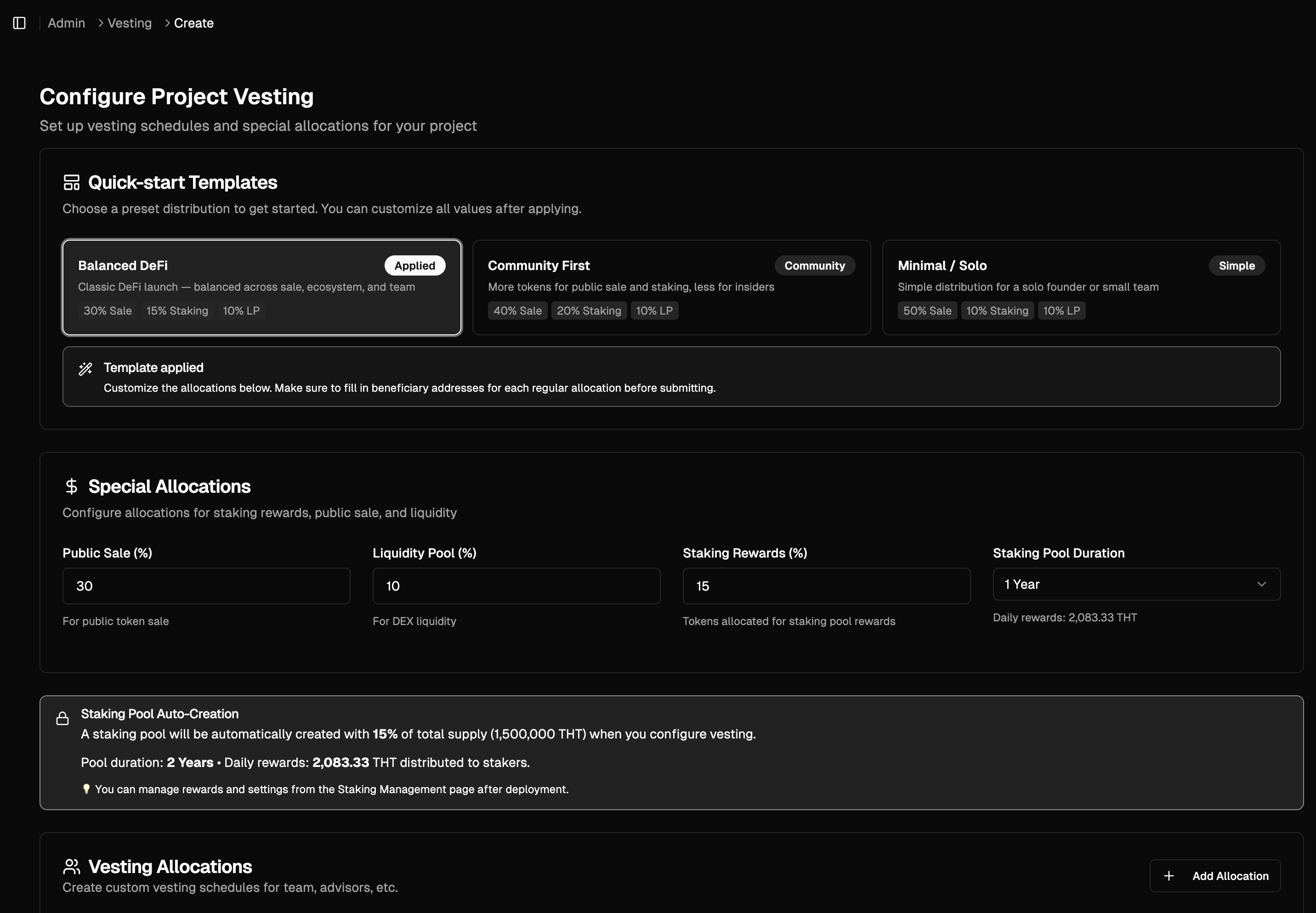
At the top of the setup form, three presets seed the entire allocation in one click. You can edit any value after applying:
| Template | Style |
| ------------------- | ------------------------------------------------------------------- |
| **Balanced DeFi** | Classic DeFi launch — split across public sale, ecosystem, and team |
| **Community First** | More tokens for public sale and staking, less for insiders |
| **Minimal / Solo** | Simple distribution for a solo founder or small team |
## Special Allocations
These three fields unlock the corresponding tools when set above 0%:
| Field | What it does |
| ----------------------- | -------------------------------------------------------------------------------------------------------------------------------------------------- |
| **Staking Rewards (%)** | Creates a staking pool that distributes this % of the supply over the configured pool duration. Also required before DAO Governance can be set up. |
| **Public Sale (%)** | Reserves this % of the supply for the Launchpad crowdsale. |
| **Liquidity Pool (%)** | Reserves this % to seed the Dozer DEX pool. |
For staking, you also pick a **Staking Pool Duration** from a dropdown. The UI automatically derives the daily reward rate from `staking allocation ÷ duration`.
## Quick-start Templates
At the top of the setup form, three presets seed the entire allocation in one click. You can edit any value after applying:
| Template | Style |
| ------------------- | ------------------------------------------------------------------- |
| **Balanced DeFi** | Classic DeFi launch — split across public sale, ecosystem, and team |
| **Community First** | More tokens for public sale and staking, less for insiders |
| **Minimal / Solo** | Simple distribution for a solo founder or small team |
## Special Allocations
These three fields unlock the corresponding tools when set above 0%:
| Field | What it does |
| ----------------------- | -------------------------------------------------------------------------------------------------------------------------------------------------- |
| **Staking Rewards (%)** | Creates a staking pool that distributes this % of the supply over the configured pool duration. Also required before DAO Governance can be set up. |
| **Public Sale (%)** | Reserves this % of the supply for the Launchpad crowdsale. |
| **Liquidity Pool (%)** | Reserves this % to seed the Dozer DEX pool. |
For staking, you also pick a **Staking Pool Duration** from a dropdown. The UI automatically derives the daily reward rate from `staking allocation ÷ duration`.
 ## Vesting Allocations
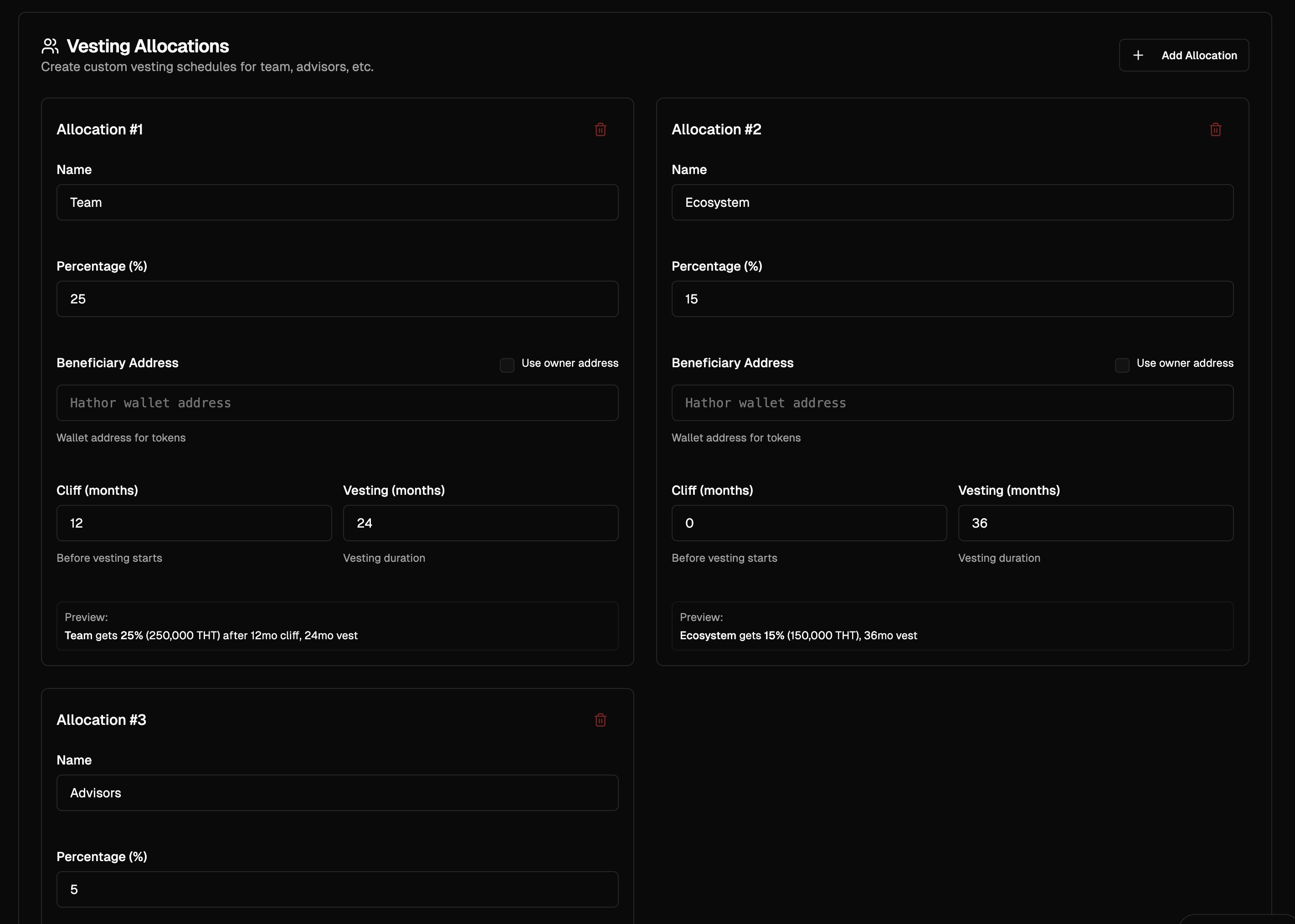
Add one row per beneficiary group. Common patterns:
| Group | Suggested cliff | Suggested vest | Typical % |
| --------- | --------------- | -------------- | --------- |
| Team | 6–12 mo | 24–48 mo | 15–25% |
| Advisors | 0–3 mo | 12–24 mo | 2–5% |
| Investors | per agreement | 12–36 mo | 20–40% |
| Ecosystem | 0 mo | 24–36 mo | varies |
Per-row fields:
* **Name** — display label (e.g. "Team, Advisors, etc.")
* **Percentage (%)** — share of total supply
* **Beneficiary Address** — Hathor address that can claim the vested tokens (toggle **Use owner address** to default to your wallet)
* **Cliff (months)** — initial lock period; nothing unlocks during this
* **Vesting (months)** — linear release window after the cliff
The **Allocation Summary** card at the bottom of the form tallies Special + Vesting totals. The **Configure Vesting** button stays disabled until the total equals exactly 100% with no unfilled rows.
## Vesting Allocations
Add one row per beneficiary group. Common patterns:
| Group | Suggested cliff | Suggested vest | Typical % |
| --------- | --------------- | -------------- | --------- |
| Team | 6–12 mo | 24–48 mo | 15–25% |
| Advisors | 0–3 mo | 12–24 mo | 2–5% |
| Investors | per agreement | 12–36 mo | 20–40% |
| Ecosystem | 0 mo | 24–36 mo | varies |
Per-row fields:
* **Name** — display label (e.g. "Team, Advisors, etc.")
* **Percentage (%)** — share of total supply
* **Beneficiary Address** — Hathor address that can claim the vested tokens (toggle **Use owner address** to default to your wallet)
* **Cliff (months)** — initial lock period; nothing unlocks during this
* **Vesting (months)** — linear release window after the cliff
The **Allocation Summary** card at the bottom of the form tallies Special + Vesting totals. The **Configure Vesting** button stays disabled until the total equals exactly 100% with no unfilled rows.
 ## Review & Deploy
1. Verify percentages add up as planned.
2. Verify every beneficiary address — these are irreversible.
3. Click **Configure Vesting**.
4. Approve the transaction in the Hathor wallet and enter your PIN.
Once confirmed:
* The corresponding tools (Launchpad / Liquidity / Staking) unlock in the dashboard checklist.
* The staking pool is live immediately if a Staking Rewards % was set.
* The Liquidity Pool reserves the DZR allocation, ready to pair with HTR via the [Liquidity tool](/project-launch-tools/vesting-configuration.md).
## The Vesting Manage View
After deployment, the Vesting page shows the active configuration.
## Review & Deploy
1. Verify percentages add up as planned.
2. Verify every beneficiary address — these are irreversible.
3. Click **Configure Vesting**.
4. Approve the transaction in the Hathor wallet and enter your PIN.
Once confirmed:
* The corresponding tools (Launchpad / Liquidity / Staking) unlock in the dashboard checklist.
* The staking pool is live immediately if a Staking Rewards % was set.
* The Liquidity Pool reserves the DZR allocation, ready to pair with HTR via the [Liquidity tool](/project-launch-tools/vesting-configuration.md).
## The Vesting Manage View
After deployment, the Vesting page shows the active configuration.
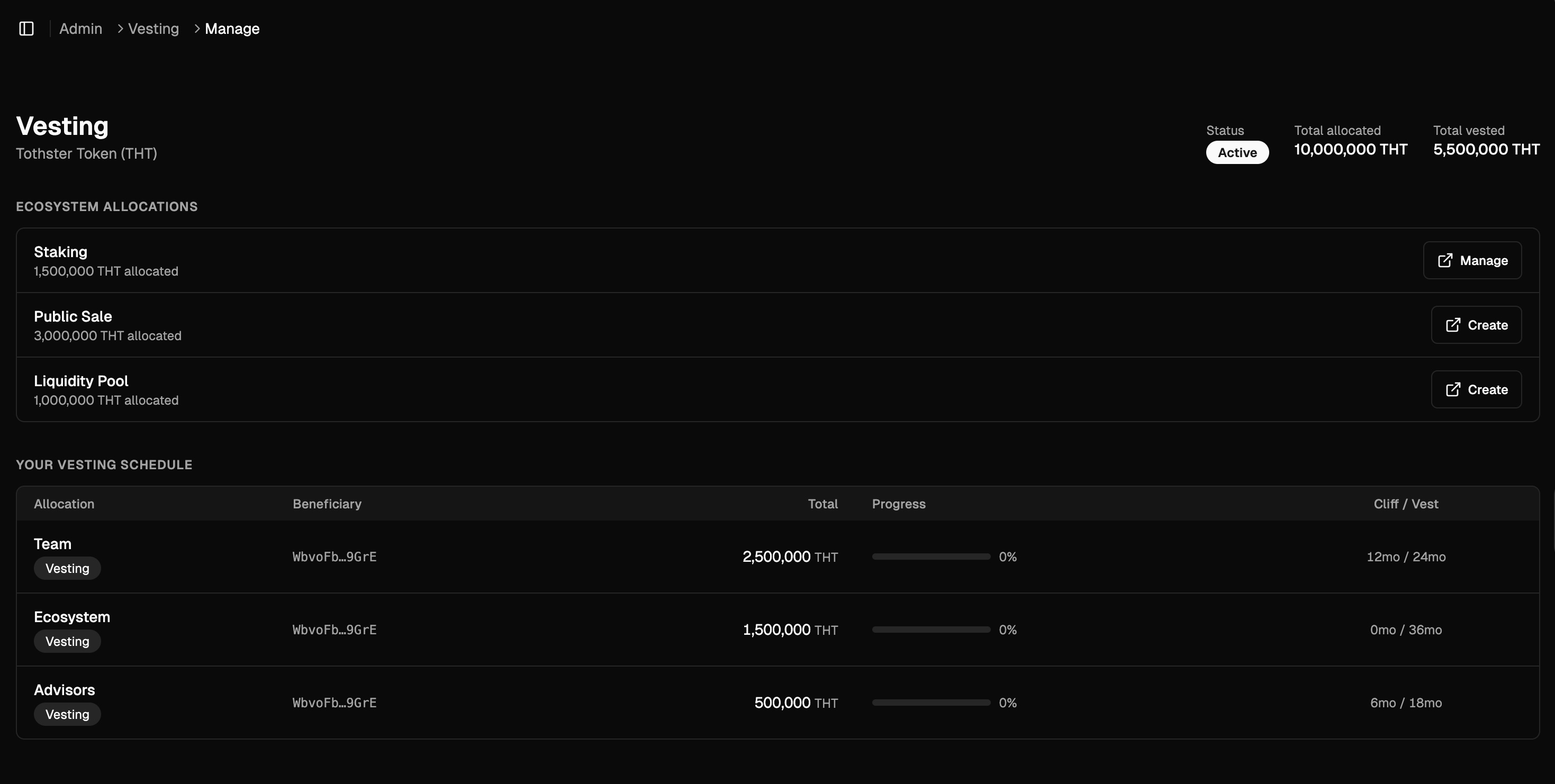 Header KPIs:
* **Status** — Active / Inactive
* **Total allocated** — full supply allocated through vesting
* **Total vested** — sum already unlocked across all beneficiaries
**Ecosystem Allocations** (the label used in the Manage view) lists Staking, Public Sale, Liquidity Pool — each with a **Manage** button that links to the corresponding tool (Create for ones not yet deployed).
**Your Vesting Schedule** is a per-allocation table:
| Column | Notes |
| ------------ | --------------------------------------- |
| Allocation | Name + Vesting tag |
| Beneficiary | Truncated Hathor address |
| Total | Total tokens reserved |
| Progress | % unlocked so far (linear progress bar) |
| Cliff / Vest | e.g. `12mo / 24mo` |
Beneficiaries view this same schedule from the public token page — see the [Token Claiming](/project-launch-tools/token-claiming.md) guide.
## Best Practices
* **Plan ecosystem % first**: it determines how much remains for team/advisors/investors.
* **Test on testnet** with realistic allocations before mainnet.
* **Use multisig addresses** for large team or treasury allocations.
* **Document publicly**: post your vesting schedule on your project's site for transparency.
## Troubleshooting
| Symptom | Fix |
| ---------------------------------------- | ---------------------------------------------------------------- |
| `Configure Vesting` button disabled | Total allocations exceed 100% — reduce some rows |
| Beneficiary field rejects address | Address must be a valid Hathor address; check for whitespace |
| Staking tool doesn't unlock after deploy | Staking Rewards % was 0 — re-configure or skip staking |
| Transaction fails | Check HTR/DZR balance and that the wallet session hasn't expired |
## Next Steps
* [Launchpad / Crowdsale](/project-launch-tools/crowdsale.md) — if you allocated a Public Sale %
* [Staking](/project-launch-tools/staking.md) — if you allocated Staking Rewards %
* [Token Claiming](/project-launch-tools/token-claiming.md) — what beneficiaries see and how they claim
Header KPIs:
* **Status** — Active / Inactive
* **Total allocated** — full supply allocated through vesting
* **Total vested** — sum already unlocked across all beneficiaries
**Ecosystem Allocations** (the label used in the Manage view) lists Staking, Public Sale, Liquidity Pool — each with a **Manage** button that links to the corresponding tool (Create for ones not yet deployed).
**Your Vesting Schedule** is a per-allocation table:
| Column | Notes |
| ------------ | --------------------------------------- |
| Allocation | Name + Vesting tag |
| Beneficiary | Truncated Hathor address |
| Total | Total tokens reserved |
| Progress | % unlocked so far (linear progress bar) |
| Cliff / Vest | e.g. `12mo / 24mo` |
Beneficiaries view this same schedule from the public token page — see the [Token Claiming](/project-launch-tools/token-claiming.md) guide.
## Best Practices
* **Plan ecosystem % first**: it determines how much remains for team/advisors/investors.
* **Test on testnet** with realistic allocations before mainnet.
* **Use multisig addresses** for large team or treasury allocations.
* **Document publicly**: post your vesting schedule on your project's site for transparency.
## Troubleshooting
| Symptom | Fix |
| ---------------------------------------- | ---------------------------------------------------------------- |
| `Configure Vesting` button disabled | Total allocations exceed 100% — reduce some rows |
| Beneficiary field rejects address | Address must be a valid Hathor address; check for whitespace |
| Staking tool doesn't unlock after deploy | Staking Rewards % was 0 — re-configure or skip staking |
| Transaction fails | Check HTR/DZR balance and that the wallet session hasn't expired |
## Next Steps
* [Launchpad / Crowdsale](/project-launch-tools/crowdsale.md) — if you allocated a Public Sale %
* [Staking](/project-launch-tools/staking.md) — if you allocated Staking Rewards %
* [Token Claiming](/project-launch-tools/token-claiming.md) — what beneficiaries see and how they claim