> For the complete documentation index, see [llms.txt](https://docs.dozer.finance/llms.txt). Markdown versions of documentation pages are available by appending `.md` to page URLs; this page is available as [Markdown](https://docs.dozer.finance/project-launch-tools/project-creation.md).
# Project Creation
This guide walks through creating a new token project on [testnet.tools.dozer.finance](https://testnet.tools.dozer.finance/). The same flow applies on mainnet when it launches.
## Prerequisites
* Hathor wallet with Reown / WalletConnect support
* HTR for the creation fee (currently **100 HTR**) — or **50 DZR** if you hold DZR
* Token plan: name, symbol, supply, and optional metadata
## Step 1 — Open the Admin Dashboard
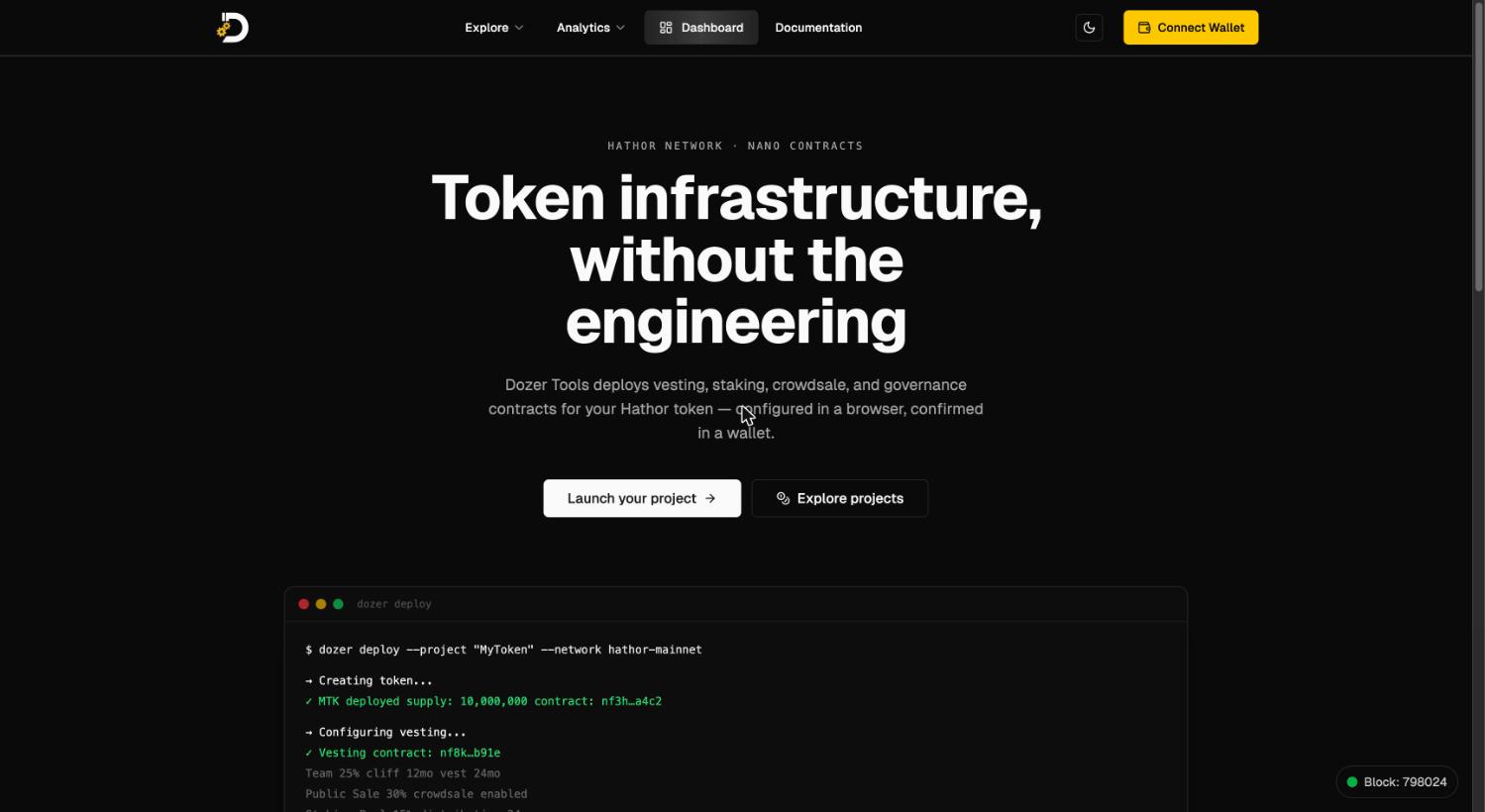
1. Visit [testnet.tools.dozer.finance](https://testnet.tools.dozer.finance/).
2. Click **Launch your project**.
3. The admin dashboard loads at `/admin` with a "Get Started with Your First Project" card and a **Connect Wallet** button.
 ## Step 2 — Connect Your Wallet
1. Click **Connect Wallet** in the center card (or in the sidebar footer).
2. A **WalletConnect** modal appears with a QR code and a copy-link icon.
## Step 2 — Connect Your Wallet
1. Click **Connect Wallet** in the center card (or in the sidebar footer).
2. A **WalletConnect** modal appears with a QR code and a copy-link icon.
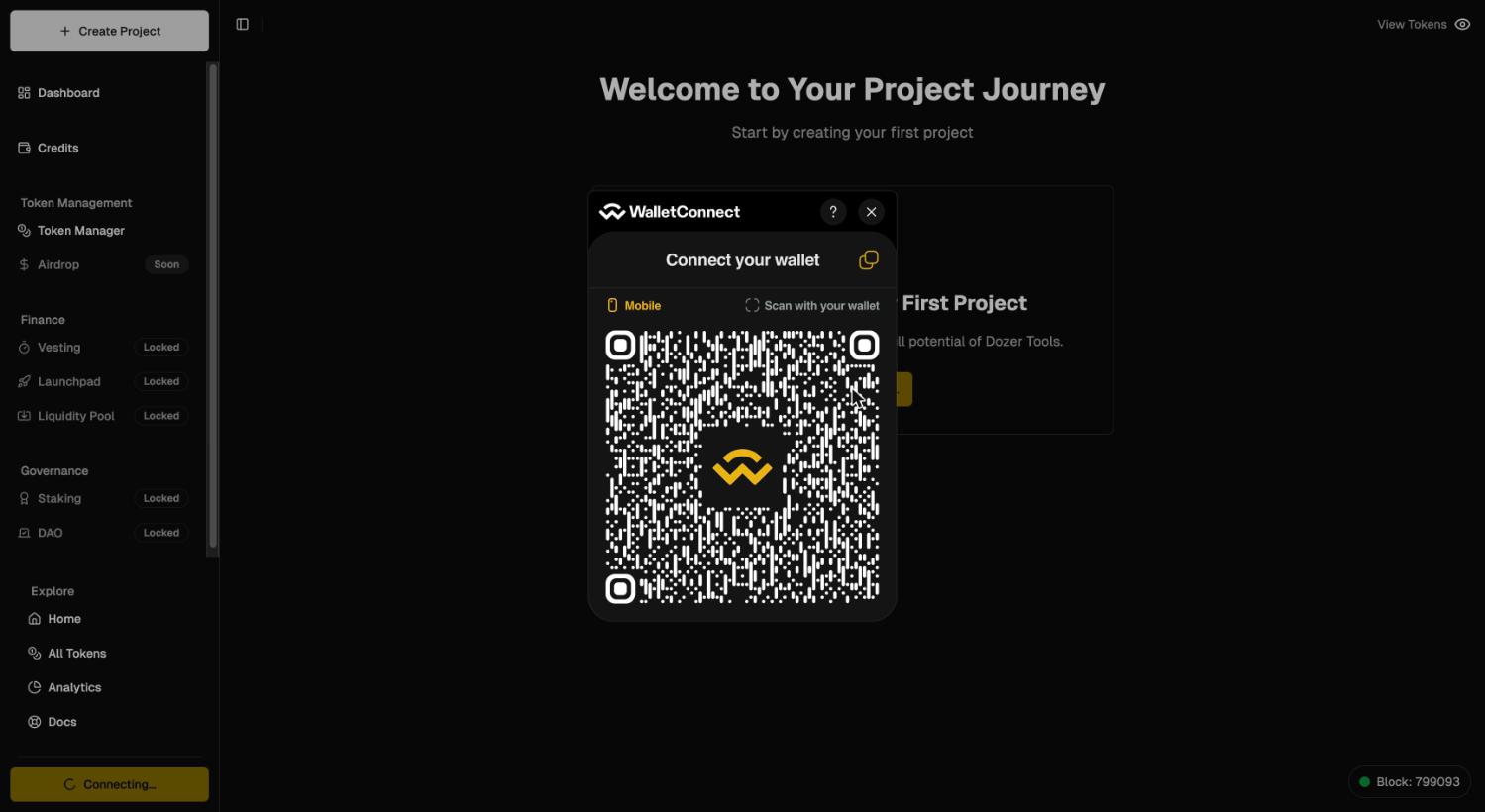 3. Click the **copy** icon to copy the connection URI.
4. Open the Hathor wallet and click the **QR-code icon** in the top right.
5. Tap **Manual** → **Reown Connection**, paste the URI, then **Connect**.
6. Approve the session request in the wallet.
The dashboard reloads in its connected state: the sidebar footer shows your address with a green **Connected** indicator, and the **Create Project** button appears at the top of the sidebar.
## Step 3 — Open the Create Project Form
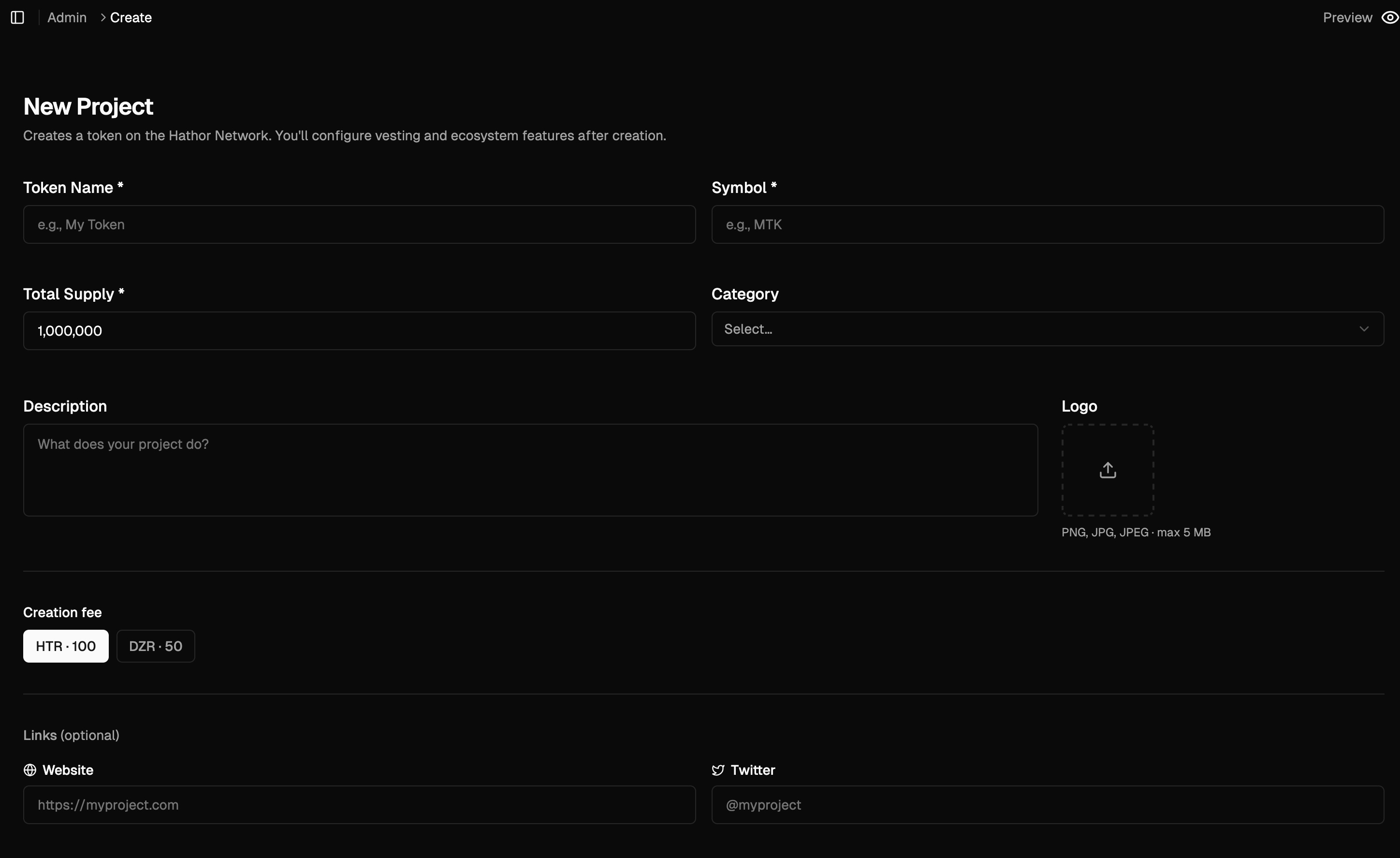
Click **+ Create Project** in the top-left of the sidebar. You land on the **New Project** form.
3. Click the **copy** icon to copy the connection URI.
4. Open the Hathor wallet and click the **QR-code icon** in the top right.
5. Tap **Manual** → **Reown Connection**, paste the URI, then **Connect**.
6. Approve the session request in the wallet.
The dashboard reloads in its connected state: the sidebar footer shows your address with a green **Connected** indicator, and the **Create Project** button appears at the top of the sidebar.
## Step 3 — Open the Create Project Form
Click **+ Create Project** in the top-left of the sidebar. You land on the **New Project** form.
 ## Step 4 — Fill the Form
### Required Fields
| Field | Notes |
| ---------------- | ---------------------------------------------------------------------------------------------------------------------------------------------------- |
| **Token Name** | Full display name (e.g. "My Token"). Permanent. |
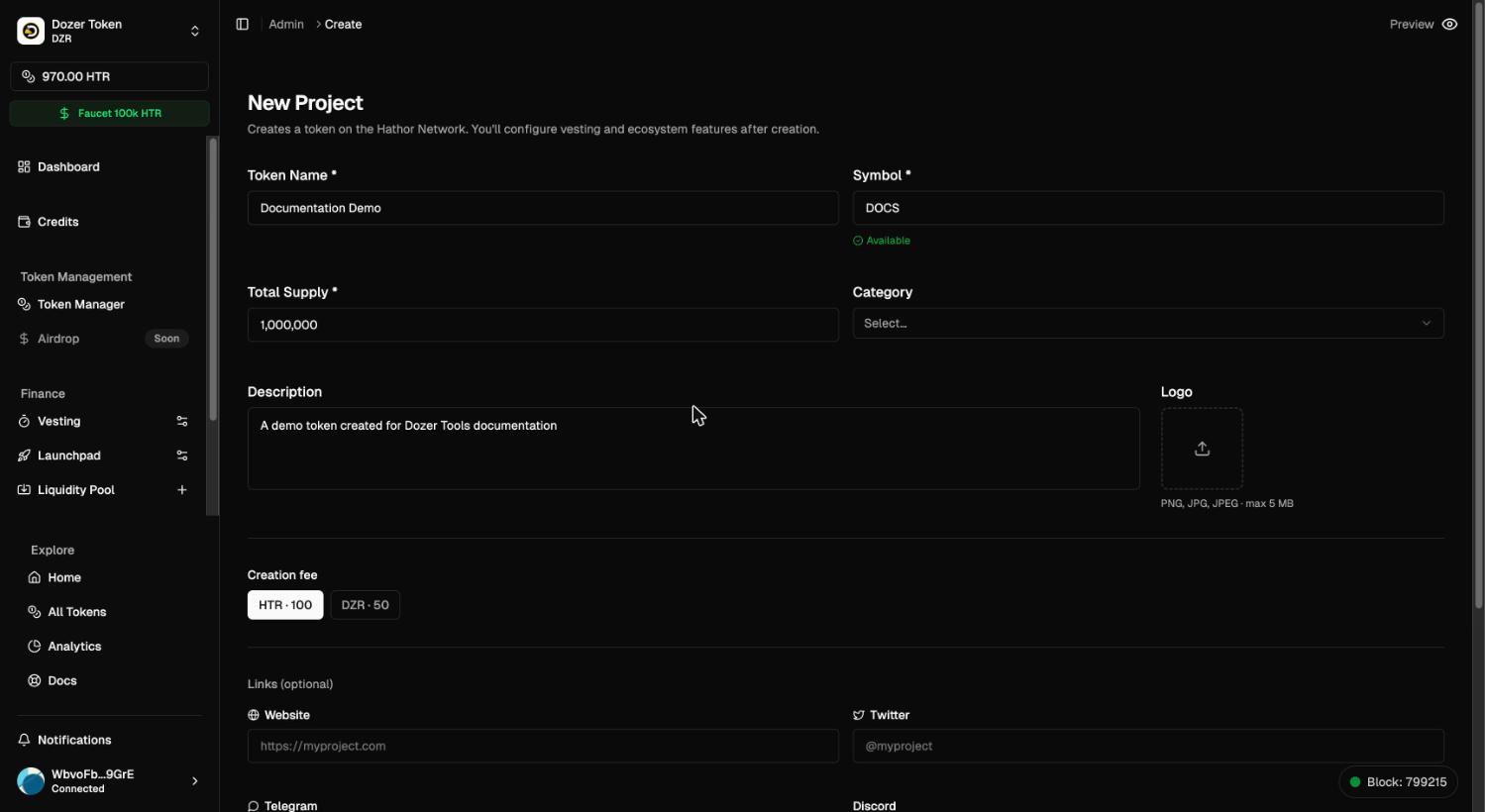
| **Symbol** | Short ticker (typically 3-5 chars, e.g. "MTK"). Permanent and must be unique on the network — a green ✓ **Available** badge confirms it as you type. |
| **Total Supply** | Maximum tokens that will ever exist. Permanent. Default `1,000,000`. |
### Optional Fields
| Field | Notes |
| --------------- | ------------------------------------------------------- |
| **Category** | Categorisation in the public token explorer |
| **Description** | Shown on the public token page |
| **Logo** | PNG/JPG/JPEG, max 5 MB |
| **Links** | Website, Twitter, Telegram, Discord, GitHub, Whitepaper |
### Creation Fee
Choose how to pay the deployment fee:
* **HTR · 100** (default)
* **DZR · 50**
## Step 4 — Fill the Form
### Required Fields
| Field | Notes |
| ---------------- | ---------------------------------------------------------------------------------------------------------------------------------------------------- |
| **Token Name** | Full display name (e.g. "My Token"). Permanent. |
| **Symbol** | Short ticker (typically 3-5 chars, e.g. "MTK"). Permanent and must be unique on the network — a green ✓ **Available** badge confirms it as you type. |
| **Total Supply** | Maximum tokens that will ever exist. Permanent. Default `1,000,000`. |
### Optional Fields
| Field | Notes |
| --------------- | ------------------------------------------------------- |
| **Category** | Categorisation in the public token explorer |
| **Description** | Shown on the public token page |
| **Logo** | PNG/JPG/JPEG, max 5 MB |
| **Links** | Website, Twitter, Telegram, Discord, GitHub, Whitepaper |
### Creation Fee
Choose how to pay the deployment fee:
* **HTR · 100** (default)
* **DZR · 50**
 > ⚠️ **Permanent fields**: Token Name, Symbol, and Total Supply cannot be changed after deployment. Double-check before submitting.
## Step 5 — Deploy
1. Scroll to the bottom of the form. The total **Fee** is shown next to the **Create Project** button.
2. Click **Create Project**. The button changes to **Accept in wallet…**
3. Approve the transaction in the Hathor wallet and enter your PIN.
4. Wait for confirmation. You'll be redirected to the project's admin dashboard.
## Step 6 — Project Dashboard
After deployment, the project dashboard shows:
* **Header card**: token icon, name, symbol, holders, market cap, total supply, price, plus **View on Explorer** and **Manage Token** buttons.
* **Project Setup**: a six-step checklist tracking the remaining setup actions.
> ⚠️ **Permanent fields**: Token Name, Symbol, and Total Supply cannot be changed after deployment. Double-check before submitting.
## Step 5 — Deploy
1. Scroll to the bottom of the form. The total **Fee** is shown next to the **Create Project** button.
2. Click **Create Project**. The button changes to **Accept in wallet…**
3. Approve the transaction in the Hathor wallet and enter your PIN.
4. Wait for confirmation. You'll be redirected to the project's admin dashboard.
## Step 6 — Project Dashboard
After deployment, the project dashboard shows:
* **Header card**: token icon, name, symbol, holders, market cap, total supply, price, plus **View on Explorer** and **Manage Token** buttons.
* **Project Setup**: a six-step checklist tracking the remaining setup actions.
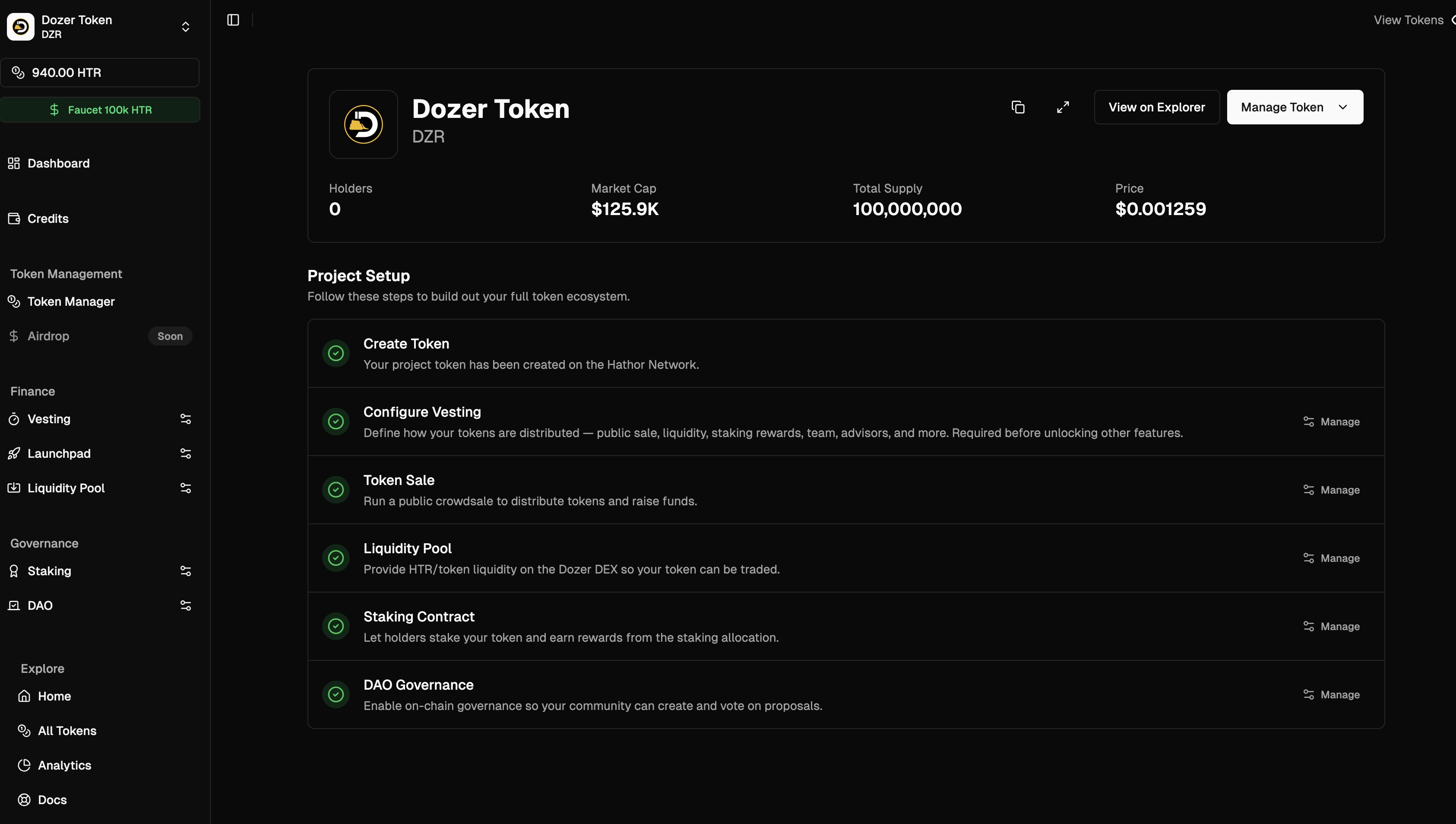 | Step | Status flag | Action |
| ------------------------- | --------------------------------------------- | ------------- |
| 1. Create Token | ✅ done | — |
| 2. Configure Vesting | required next | **Manage** |
| 3. Token Sale (Launchpad) | unlocks after #2 | **Manage** |
| 4. Liquidity Pool | unlocks after #2 | **Configure** |
| 5. Staking Contract | created by #2 if you allocate Staking Rewards | **Manage** |
| 6. DAO Governance | **requires Staking Contract** | **Set up** |
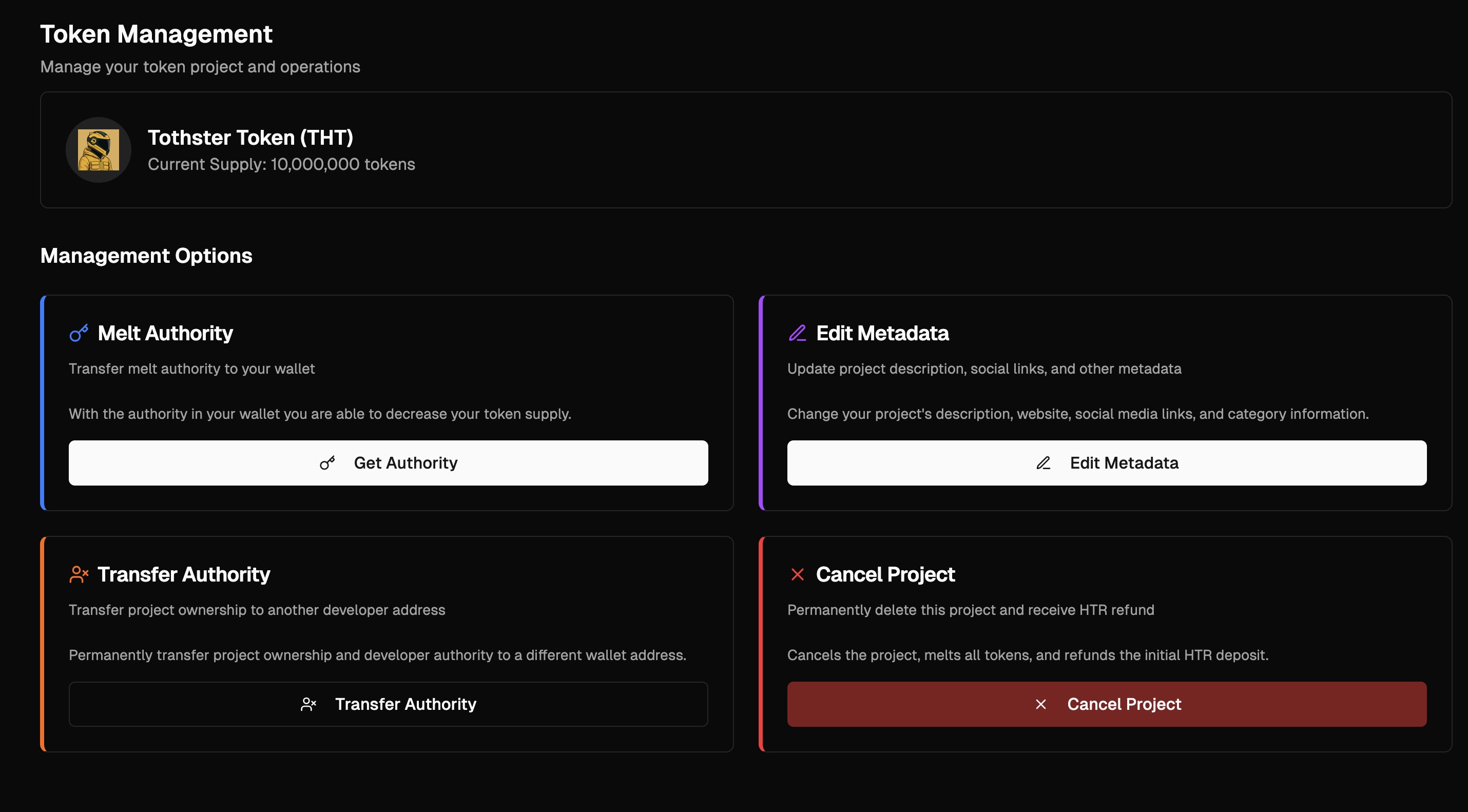
## Token Manager Options
From the sidebar's **Token Manager** section, four actions are available:
* **Melt Authority** — Transfer melt rights to your wallet so you can decrease total supply.
* **Edit Metadata** — Update description, social links, category, etc.
* **Transfer Authority** — Permanently transfer project ownership to another developer address.
* **Cancel Project** — Only available before vesting is configured. After vesting deploys, the project cannot be cancelled.
| Step | Status flag | Action |
| ------------------------- | --------------------------------------------- | ------------- |
| 1. Create Token | ✅ done | — |
| 2. Configure Vesting | required next | **Manage** |
| 3. Token Sale (Launchpad) | unlocks after #2 | **Manage** |
| 4. Liquidity Pool | unlocks after #2 | **Configure** |
| 5. Staking Contract | created by #2 if you allocate Staking Rewards | **Manage** |
| 6. DAO Governance | **requires Staking Contract** | **Set up** |
## Token Manager Options
From the sidebar's **Token Manager** section, four actions are available:
* **Melt Authority** — Transfer melt rights to your wallet so you can decrease total supply.
* **Edit Metadata** — Update description, social links, category, etc.
* **Transfer Authority** — Permanently transfer project ownership to another developer address.
* **Cancel Project** — Only available before vesting is configured. After vesting deploys, the project cannot be cancelled.
 ## Troubleshooting
| Symptom | Fix |
| --------------------------- | ----------------------------------------------------------------- |
| Wallet won't connect | The Reown URI expires quickly — copy and paste in one go |
| Symbol shows as unavailable | Another project already uses it; pick a different one |
| Transaction fails | Confirm HTR balance covers the 100 HTR fee, or switch to DZR · 50 |
| "Connecting…" button stuck | Refresh and reconnect; sessions can drop after long idle |
## Next Steps
Once your token is created, continue with [Vesting Configuration](/project-launch-tools/vesting-configuration.md) at `/admin/vesting/create` — vesting is required before any other tool unlocks, and the form offers Quick-start Templates if you want a sensible default.
## Troubleshooting
| Symptom | Fix |
| --------------------------- | ----------------------------------------------------------------- |
| Wallet won't connect | The Reown URI expires quickly — copy and paste in one go |
| Symbol shows as unavailable | Another project already uses it; pick a different one |
| Transaction fails | Confirm HTR balance covers the 100 HTR fee, or switch to DZR · 50 |
| "Connecting…" button stuck | Refresh and reconnect; sessions can drop after long idle |
## Next Steps
Once your token is created, continue with [Vesting Configuration](/project-launch-tools/vesting-configuration.md) at `/admin/vesting/create` — vesting is required before any other tool unlocks, and the form offers Quick-start Templates if you want a sensible default.