> For the complete documentation index, see [llms.txt](https://docs.dozer.finance/llms.txt). Markdown versions of documentation pages are available by appending `.md` to page URLs; this page is available as [Markdown](https://docs.dozer.finance/project-launch-tools/overview.md).
# Overview
Dozer Project Launch Tools deploy a complete token ecosystem — vesting, public sale, liquidity, staking, and DAO governance — directly from a browser, with each on-chain action confirmed in the project owner's wallet.
The landing page at [testnet.tools.dozer.finance](https://testnet.tools.dozer.finance/) is the entry point for both project creators and token holders.
 ## What You Can Deploy
| Tool | Purpose |
| ------------------ | --------------------------------------------------------------- |
| **Token** | Create a Hathor token with custom name, symbol, and supply |
| **Vesting** | Lock and release tokens over time for team, advisors, ecosystem |
| **Launchpad** | Run a public crowdsale with soft/hard caps and refunds |
| **Liquidity Pool** | Seed a DZR/token pool on the Dozer DEX |
| **Staking** | Distribute rewards to token holders who lock their tokens |
| **DAO Governance** | On-chain proposals and quorum-based voting |
## The Project Setup Flow
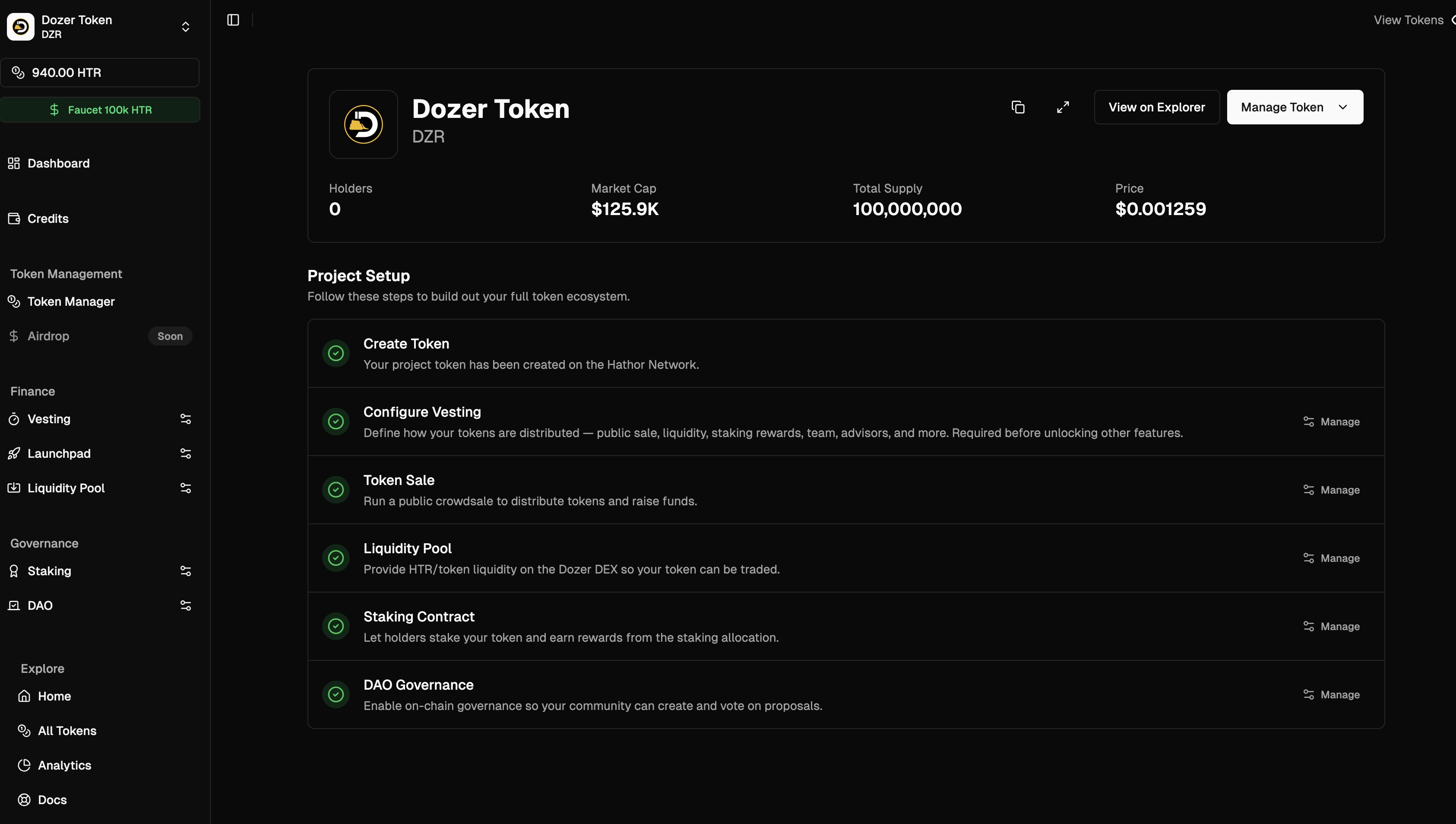
Once you connect a wallet and select a project, the admin dashboard shows a six-step checklist:
1. **Create Token** — set name, symbol, supply, and metadata
2. **Configure Vesting** — split your supply across ecosystem allocations and custom schedules
3. **Token Sale** — run an optional public crowdsale
4. **Liquidity Pool** — provide initial liquidity on the Dozer DEX
5. **Staking Contract** — activate the rewards pool defined in vesting
6. **DAO Governance** — enable on-chain voting
Vesting gates everything else. Inside vesting, each Special Allocation % unlocks its corresponding tool: **Public Sale %** unlocks the Launchpad, **Liquidity Pool %** unlocks the Liquidity tool, **Staking Rewards %** auto-deploys the staking pool. DAO Governance additionally requires a Staking Contract — you can't set it up without one.
## What You Can Deploy
| Tool | Purpose |
| ------------------ | --------------------------------------------------------------- |
| **Token** | Create a Hathor token with custom name, symbol, and supply |
| **Vesting** | Lock and release tokens over time for team, advisors, ecosystem |
| **Launchpad** | Run a public crowdsale with soft/hard caps and refunds |
| **Liquidity Pool** | Seed a DZR/token pool on the Dozer DEX |
| **Staking** | Distribute rewards to token holders who lock their tokens |
| **DAO Governance** | On-chain proposals and quorum-based voting |
## The Project Setup Flow
Once you connect a wallet and select a project, the admin dashboard shows a six-step checklist:
1. **Create Token** — set name, symbol, supply, and metadata
2. **Configure Vesting** — split your supply across ecosystem allocations and custom schedules
3. **Token Sale** — run an optional public crowdsale
4. **Liquidity Pool** — provide initial liquidity on the Dozer DEX
5. **Staking Contract** — activate the rewards pool defined in vesting
6. **DAO Governance** — enable on-chain voting
Vesting gates everything else. Inside vesting, each Special Allocation % unlocks its corresponding tool: **Public Sale %** unlocks the Launchpad, **Liquidity Pool %** unlocks the Liquidity tool, **Staking Rewards %** auto-deploys the staking pool. DAO Governance additionally requires a Staking Contract — you can't set it up without one.
 ## Prerequisites
* **Hathor wallet** with Reown (WalletConnect) support — [Hathor Wallet desktop or mobile](https://hathor.network/wallets/)
* **HTR** (or **DZR**) for transaction fees and the credits balance
* **Modern browser** (Chrome, Brave, Edge, Firefox)
> **Testnet**: For testing on `testnet.tools.dozer.finance`, use the **Faucet 100k HTR** button in the sidebar to top up the wallet balance.
## Connecting Your Wallet
1. From the admin dashboard, click **Connect Wallet**.
2. A WalletConnect modal appears with a QR code and a copy-link icon.
3. In your Hathor wallet, open the **QR-code icon** at the top right, choose **Manual**, then **Reown Connection**.
4. Paste the URI and click **Connect**. Approve the session request that follows.
The wallet address shown in the sidebar footer changes from `Connect Wallet` to your address with a green "Connected" indicator.
## Credits
Most on-chain operations (creating staking pools, DAOs, crowdsales, liquidity pools) are paid from a per-project **Credits** balance, not directly from the wallet.
* Credits can be funded in **HTR** or **DZR**
* DZR is preferred when both are available (lower fees)
* Unused credits can be withdrawn at any time
Minimum HTR deposit is **100.00 HTR**. See the [Credits screen](/project-launch-tools/overview.md) inside each project for current balance and deposit/withdraw forms.
## Next Steps
* [Project Creation Guide](/project-launch-tools/project-creation.md) — create your token
* [Vesting Configuration](/project-launch-tools/vesting-configuration.md) — define how tokens unlock
* [Launchpad / Crowdsale](/project-launch-tools/crowdsale.md) — run a public sale
* [Staking](/project-launch-tools/staking.md) — distribute rewards to holders
* [Token Claiming](/project-launch-tools/token-claiming.md) — claim vested or purchased tokens
## Support
* [Discord](https://discord.gg/KRhaCp6P)
*
## Prerequisites
* **Hathor wallet** with Reown (WalletConnect) support — [Hathor Wallet desktop or mobile](https://hathor.network/wallets/)
* **HTR** (or **DZR**) for transaction fees and the credits balance
* **Modern browser** (Chrome, Brave, Edge, Firefox)
> **Testnet**: For testing on `testnet.tools.dozer.finance`, use the **Faucet 100k HTR** button in the sidebar to top up the wallet balance.
## Connecting Your Wallet
1. From the admin dashboard, click **Connect Wallet**.
2. A WalletConnect modal appears with a QR code and a copy-link icon.
3. In your Hathor wallet, open the **QR-code icon** at the top right, choose **Manual**, then **Reown Connection**.
4. Paste the URI and click **Connect**. Approve the session request that follows.
The wallet address shown in the sidebar footer changes from `Connect Wallet` to your address with a green "Connected" indicator.
## Credits
Most on-chain operations (creating staking pools, DAOs, crowdsales, liquidity pools) are paid from a per-project **Credits** balance, not directly from the wallet.
* Credits can be funded in **HTR** or **DZR**
* DZR is preferred when both are available (lower fees)
* Unused credits can be withdrawn at any time
Minimum HTR deposit is **100.00 HTR**. See the [Credits screen](/project-launch-tools/overview.md) inside each project for current balance and deposit/withdraw forms.
## Next Steps
* [Project Creation Guide](/project-launch-tools/project-creation.md) — create your token
* [Vesting Configuration](/project-launch-tools/vesting-configuration.md) — define how tokens unlock
* [Launchpad / Crowdsale](/project-launch-tools/crowdsale.md) — run a public sale
* [Staking](/project-launch-tools/staking.md) — distribute rewards to holders
* [Token Claiming](/project-launch-tools/token-claiming.md) — claim vested or purchased tokens
## Support
* [Discord](https://discord.gg/KRhaCp6P)
*