> For the complete documentation index, see [llms.txt](https://docs.dozer.finance/llms.txt). Markdown versions of documentation pages are available by appending `.md` to page URLs; this page is available as [Markdown](https://docs.dozer.finance/project-launch-tools/crowdsale.md).
# Crowdsale
The Launchpad tool runs a public token sale for the % of supply reserved as **Public Sale** in your vesting configuration. The dapp surfaces it as **Launchpad** in the sidebar; admin and public pages title it **Crowdsale Management** and **Token Sale** respectively.
This page covers the **project creator side** — creating, managing, and finalizing the sale. If you're a buyer looking to participate, see [Participating in a Token Sale](/user-guides/participating-in-token-sale.md).
## Prerequisites
* Project created and **vesting configured with a Public Sale %** (see [Vesting Configuration](/project-launch-tools/vesting-configuration.md)).
* HTR or DZR in the project Credits balance for the deployment transaction.
* Wallet connected as project owner.
## Step 1 — Open Launchpad Setup
From the project dashboard's setup checklist, click **Manage** on **Token Sale** — or use the sidebar's **Launchpad** entry under **Finance**.
For a project with no existing sale, the setup form loads. For projects where a sale already exists, the **Crowdsale Management** panel loads.
 ## Step 2 — Configure Sale Parameters
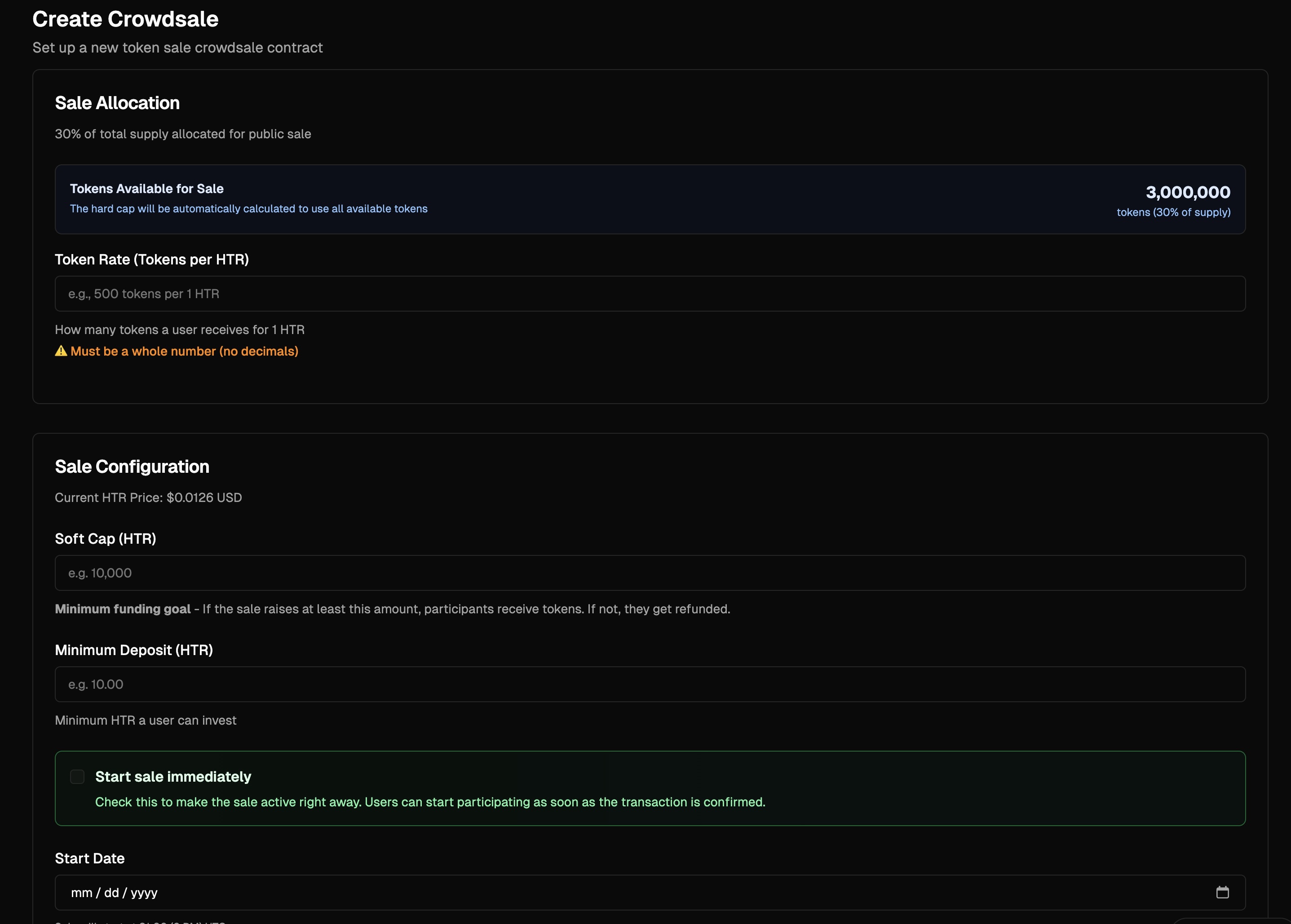
The form has two cards: **Sale Allocation** (the rate) and **Sale Configuration** (caps, dates):
| Field | Notes |
| ------------------------------- | ----------------------------------------------------------------------------------- |
| **Token Rate (Tokens per HTR)** | Exchange rate, e.g. `500` tokens per 1 HTR |
| **Soft Cap (HTR)** | Minimum funding goal. If unreached at end of sale, buyers can refund their HTR. |
| **Minimum Deposit (HTR)** | Per-transaction minimum, e.g. `10.00 HTR` |
| **Start sale immediately** | Checkbox; when on, the Start Date field is hidden and the sale opens on deployment. |
| **Start Date** | Sale opens at this timestamp (hidden if Start immediately is checked) |
| **End Date** | Sale closes at this timestamp |
The **Hard Cap is calculated automatically** as `tokens available × rate` — no field for it. Tokens available comes from your vesting Public Sale allocation. The full allocation is reserved at deployment; unsold tokens can be withdrawn after finalization.
## Step 3 — Deploy
1. Click **Create Crowdsale**.
2. Approve in the Hathor wallet and enter your PIN.
3. After confirmation, the dashboard's Token Sale step shows ✅ and the Launchpad menu now opens the **Crowdsale Management** view.
## The Crowdsale Management View
The management panel runs the sale through its lifecycle states (from `formatSaleState`):
| State | Meaning |
| -------------------- | --------------------------------------------------------------------------- |
| **Upcoming** | Deployed but Start Date hasn't been reached yet |
| **Ready** | Past Start Date but admin still needs to start the sale (manual start mode) |
| **Live** | Accepting purchases |
| **Paused** | Admin paused; purchases blocked |
| **Soft Cap Reached** | Soft Cap met but sale still running (admin may finalize early) |
| **Successful** | Finalized and Soft Cap was reached — buyers can claim, admin can withdraw |
| **Failed** | Finalized and Soft Cap was not reached — buyers can refund |
## Step 2 — Configure Sale Parameters
The form has two cards: **Sale Allocation** (the rate) and **Sale Configuration** (caps, dates):
| Field | Notes |
| ------------------------------- | ----------------------------------------------------------------------------------- |
| **Token Rate (Tokens per HTR)** | Exchange rate, e.g. `500` tokens per 1 HTR |
| **Soft Cap (HTR)** | Minimum funding goal. If unreached at end of sale, buyers can refund their HTR. |
| **Minimum Deposit (HTR)** | Per-transaction minimum, e.g. `10.00 HTR` |
| **Start sale immediately** | Checkbox; when on, the Start Date field is hidden and the sale opens on deployment. |
| **Start Date** | Sale opens at this timestamp (hidden if Start immediately is checked) |
| **End Date** | Sale closes at this timestamp |
The **Hard Cap is calculated automatically** as `tokens available × rate` — no field for it. Tokens available comes from your vesting Public Sale allocation. The full allocation is reserved at deployment; unsold tokens can be withdrawn after finalization.
## Step 3 — Deploy
1. Click **Create Crowdsale**.
2. Approve in the Hathor wallet and enter your PIN.
3. After confirmation, the dashboard's Token Sale step shows ✅ and the Launchpad menu now opens the **Crowdsale Management** view.
## The Crowdsale Management View
The management panel runs the sale through its lifecycle states (from `formatSaleState`):
| State | Meaning |
| -------------------- | --------------------------------------------------------------------------- |
| **Upcoming** | Deployed but Start Date hasn't been reached yet |
| **Ready** | Past Start Date but admin still needs to start the sale (manual start mode) |
| **Live** | Accepting purchases |
| **Paused** | Admin paused; purchases blocked |
| **Soft Cap Reached** | Soft Cap met but sale still running (admin may finalize early) |
| **Successful** | Finalized and Soft Cap was reached — buyers can claim, admin can withdraw |
| **Failed** | Finalized and Soft Cap was not reached — buyers can refund |
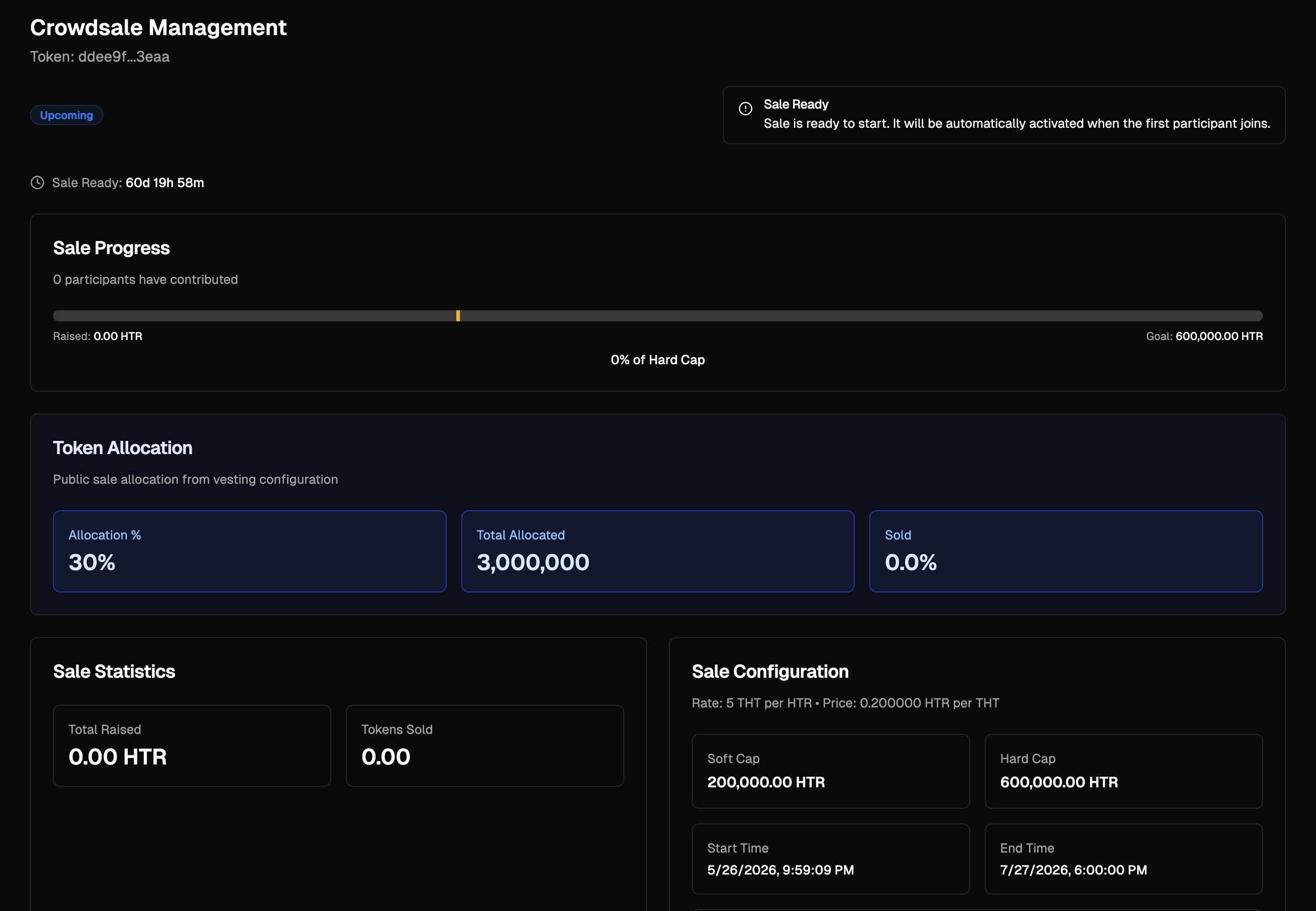 Top of page:
* **Status badge** (Upcoming / Live / Paused / Ended)
* **Countdown** to start or end
* **Start Sale Early** button (for Upcoming sales) / **Pause / Resume** / **Finalize** buttons depending on state
* **Preview Token Sale** link (top right) — opens the public sale page in a new tab
Sections:
| Section | Shows |
| ---------------------- | ------------------------------------------------------------------------ |
| **Sale Progress** | Raised amount, Hard Cap goal, % of Hard Cap, participants |
| **Token Allocation** | Allocation % from vesting, Total Allocated tokens, Sold % |
| **Sale Statistics** | Total Raised, Tokens Sold |
| **Sale Configuration** | Read-only summary: Rate, Soft Cap, Hard Cap, Start/End Time, Min Deposit |
## Pausing & Resuming
Use Pause only for emergencies (a discovered exploit, regulatory inquiry, etc.):
1. Click **Pause Sale**, approve in wallet, enter PIN.
2. Status changes to **Paused**. Buyers see a banner on the public page and the purchase form is disabled.
3. Click **Resume Sale** to re-open.
## Finalizing & Withdrawing
Once the sale has ended (or you choose to close it early after the Soft Cap is reached):
1. Click **Finalize Sale** → approve in wallet.
2. The management panel updates with final results.
3. **Withdraw Raised HTR** — sends the raised HTR to your wallet.
4. **Withdraw Remaining Tokens** — returns any unsold portion of the Public Sale allocation to your wallet.
> ⚠️ If the Soft Cap was **not** reached, the sale enters refund mode. Buyers can withdraw their HTR from the public page; you cannot withdraw the raised funds.
## For Token Buyers
The buyer-facing flow — finding a sale, purchasing, refunds, and claiming — is documented in [Participating in a Token Sale](/user-guides/participating-in-token-sale.md).
## Best Practices
* **Realistic Soft Cap** — Set it to your minimum viable funding. Too high risks sale failure and refunds.
* **Allow enough time** — 7–14 days minimum for community participation. Don't run a sale across a major regional holiday.
* **Pre-announce** — At least one week ahead, share the token address and the official `/launchpad/` URL.
* **Pause sparingly** — It shakes buyer confidence. Reserve for emergencies.
## Troubleshooting
| Symptom | Fix |
| --------------------------------- | --------------------------------------------------------------------------------------- |
| Cannot create sale | Vesting must have Public Sale % > 0 |
| Sale stuck in Upcoming past start | If "Start sale immediately" was off, click **Start Sale Early** in the management panel |
| Finalize button disabled | Sale period must have ended OR Soft Cap reached |
| Withdraw HTR fails | Sale must be finalized first; check the Credits balance |
## Next Steps
* [Staking](/project-launch-tools/staking.md) — set up a rewards pool for your token holders
* [Token Claiming](/project-launch-tools/token-claiming.md) — concept overview of how beneficiaries access their tokens
Top of page:
* **Status badge** (Upcoming / Live / Paused / Ended)
* **Countdown** to start or end
* **Start Sale Early** button (for Upcoming sales) / **Pause / Resume** / **Finalize** buttons depending on state
* **Preview Token Sale** link (top right) — opens the public sale page in a new tab
Sections:
| Section | Shows |
| ---------------------- | ------------------------------------------------------------------------ |
| **Sale Progress** | Raised amount, Hard Cap goal, % of Hard Cap, participants |
| **Token Allocation** | Allocation % from vesting, Total Allocated tokens, Sold % |
| **Sale Statistics** | Total Raised, Tokens Sold |
| **Sale Configuration** | Read-only summary: Rate, Soft Cap, Hard Cap, Start/End Time, Min Deposit |
## Pausing & Resuming
Use Pause only for emergencies (a discovered exploit, regulatory inquiry, etc.):
1. Click **Pause Sale**, approve in wallet, enter PIN.
2. Status changes to **Paused**. Buyers see a banner on the public page and the purchase form is disabled.
3. Click **Resume Sale** to re-open.
## Finalizing & Withdrawing
Once the sale has ended (or you choose to close it early after the Soft Cap is reached):
1. Click **Finalize Sale** → approve in wallet.
2. The management panel updates with final results.
3. **Withdraw Raised HTR** — sends the raised HTR to your wallet.
4. **Withdraw Remaining Tokens** — returns any unsold portion of the Public Sale allocation to your wallet.
> ⚠️ If the Soft Cap was **not** reached, the sale enters refund mode. Buyers can withdraw their HTR from the public page; you cannot withdraw the raised funds.
## For Token Buyers
The buyer-facing flow — finding a sale, purchasing, refunds, and claiming — is documented in [Participating in a Token Sale](/user-guides/participating-in-token-sale.md).
## Best Practices
* **Realistic Soft Cap** — Set it to your minimum viable funding. Too high risks sale failure and refunds.
* **Allow enough time** — 7–14 days minimum for community participation. Don't run a sale across a major regional holiday.
* **Pre-announce** — At least one week ahead, share the token address and the official `/launchpad/` URL.
* **Pause sparingly** — It shakes buyer confidence. Reserve for emergencies.
## Troubleshooting
| Symptom | Fix |
| --------------------------------- | --------------------------------------------------------------------------------------- |
| Cannot create sale | Vesting must have Public Sale % > 0 |
| Sale stuck in Upcoming past start | If "Start sale immediately" was off, click **Start Sale Early** in the management panel |
| Finalize button disabled | Sale period must have ended OR Soft Cap reached |
| Withdraw HTR fails | Sale must be finalized first; check the Credits balance |
## Next Steps
* [Staking](/project-launch-tools/staking.md) — set up a rewards pool for your token holders
* [Token Claiming](/project-launch-tools/token-claiming.md) — concept overview of how beneficiaries access their tokens